


Preface
For a very long time, the infrastructure at Cốc Cốc only supports traditional services running on physical hosts. Recently on the rise of microservices, the trendy container orchestration technology K8s has been adapted as a big part of the grand design. Therefore, the infrastructure also needs a huge shift to not only support conventional but containerized microservices as well. In this article, we’re gonna go through how load-balancing is being implemented to publish K8s services from a very old-fashioned setup.
Load-balancing infrastructure
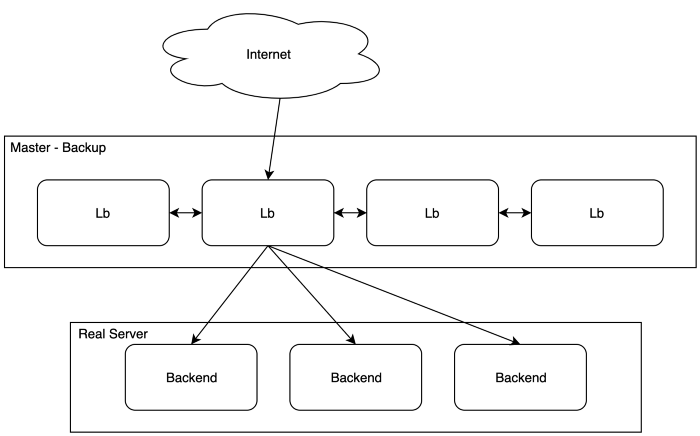
simple traditional LB infrastructure
As depicted above, the primitive infrastructure for load-balancing architecture is straightforward:
- 4 LBs are Internet-facing servers that utilize master-backup VRRP (Virtual Router Redundancy Protocol) providing high availability and load-balancing solution for the backend services. In this case, the 2nd server is the master and takes the VIP (floating virtual IP), distributing the load to 3 underlying backends.
- LB framework is implemented using keepalived, employing native Linux kernel module IPVS (Linux Virtual Server)
- The balancing algorithm is WRR (weighted round robin), basically, the 3 backends are taking the same weight.
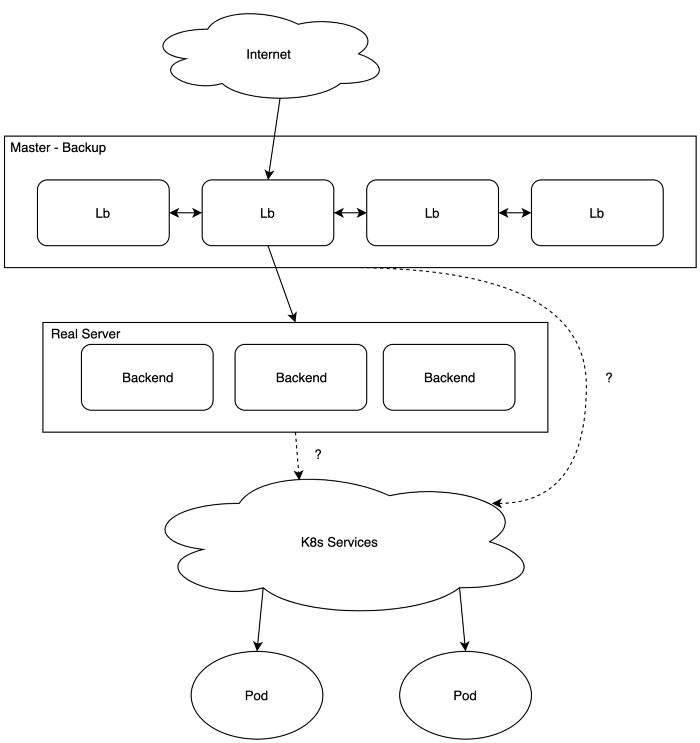
This setup works nicely with traditional services which run on physical hosts for a long time. However, recently we’ve been adapting Kubernetes to the infrastructure, and this LB setup has a remarkable limitation:
- If using Pods’ IPs, they’re ephemeral, while IPVS configuration needs fixed IPs.
- The service’s IP can be static, but there are bigger issues:
For using IPVS, the backend server also needs the VIP configured on its interfaces so it doesn't drop the packets forwarded. While K8s’s IP is just a virtual one that lives inside calico’s network infrastructure (iptables), it’s not really an actual IP for real interface and so it couldn't receive the packets forwarded from keepalived.
In short, Real Server’s (RS) addresses couldn’t be k8s’s IPs. There need to be real physical backends.
How to publish K8s services?
Traditional approach
The simplest publishing method is to make Nginx reverse proxy on each backend, proxy_pass’ing to k8s’s services using DNS-based service discovery (provided by CoreDNS). For example:
| location / { proxy_pass "http://music.browser-prod.svc.cluster.local/"; } |
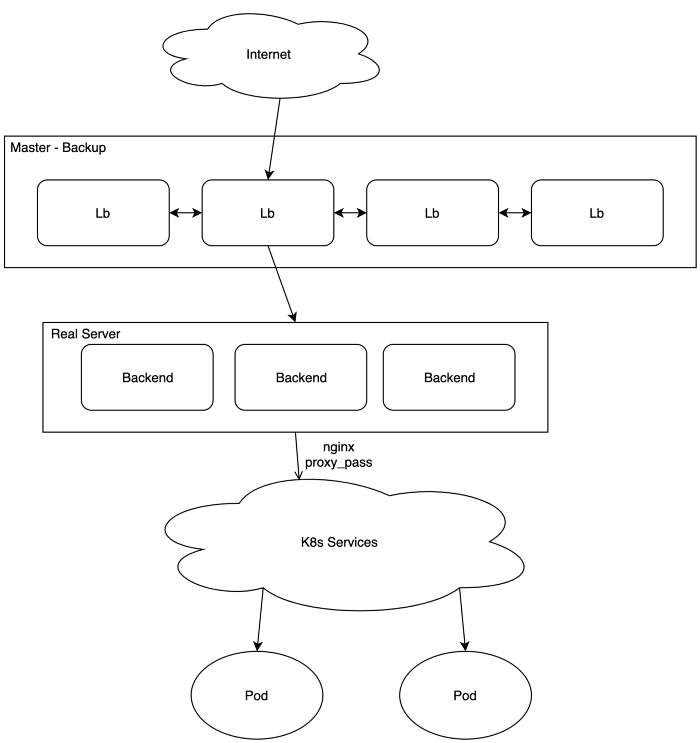
Nginx proxy_pass to K8s service
For this approach:
- Real servers’ IPs are still backends’ IPs, which is acceptable for keepalived.
- Load-balancing and high availability are now K8s service’s responsibility, controlled by DNS Round Robin (headless service) or iptables’s TCP load-balancing. Nginx proxy knows nothing about the underlying pods so it couldn’t handle load-balancing by itself.
Besides, some tunings are necessary to make it really works:
DNS caching issue
Whenever services are redeployed, the IPs change (unless the services’ IPs are static). By default Nginx caches domains for the 60s, so it can only detect IP change after around 60s, which makes service unavailable for the same amount of time! This is HUGE.
Solution: make the DNS cache TTL shorter:
| resolver 127.0.0.1 valid=1s; |
Remote Addr preservation issue
Client IPs that go through the L7 reverse proxy will not be preserved and changed to the proxy’s IP. In several cases, we still need this information for rate limiting, ACL, and monitoring…
Solution: use Nginx's real IP module, making use of the X-Forwarded-For header:
| set_real_ip_from 172.16.16.0/24; real_ip_header X-Forwarded-For; real_ip_recursive on; |
With the solutions to the corresponding issues, this is the simplest approach that works to make a K8s service published to the outside. Practically it works fine most of the time, despite some outstanding problems:
- Load-balancing and high availability are totally controlled by DNS RR or iptables. Due to the fact that the upstream for proxy_pass contains only 1 domain, there’ll be no retry from Nginx if it marks the upstream as a failure. Nginx only acts as a gateway for k8s services, not providing any high-availability or load-balancing mechanism.
- Misconfiguration of deployment’s readinessProbe makes requests sent to failed pods (and without retry as stated above) because service DNS doesn't remove it from the IP pool.
- A new dummy Nginx configuration (only for proxy_pass) needs to be created on backend servers for every new k8s service.
Nginx Ingress approach
This is a native K8s service discovery, which means the ingress controller can communicate directly with the pods, not through the service, hence load-balancing doesn't need to rely on K8s service anymore. Let’s see if it can fit in the on-premise infrastructure.
First, let’s get a brief description of what the Ingress controller and Ingress (resource) are. We’re talking specifically about the Nginx Ingress controller.
Ingress Controller
- An Nginx instance that utilizes Ingress resources as configuration
- Native K8s service discovery without relying on DNS-based service discovery
- Content-based routing support
- TLS termination support
Ingress Resource
- Configuration for Ingress controller
The Implementation
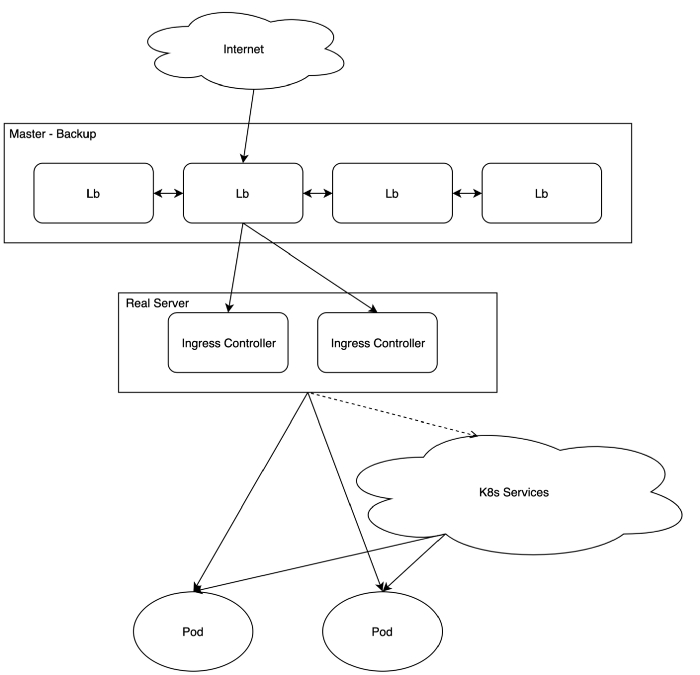
- Under LBs, there are 2 physical servers acting as Nginx Ingress controller backends. Actually, for each K8s namespace, there’ll be different pairs of ingress controller servers for better separation, but for the sake of simplicity, we don’t go into details here.
- Nginx ingress controller is a pod running on a physical host with hostNetwork port 80 and 443.
What we have with this approach:
- For every exposing service, there’s only a need for one simple Ingress resource.
- Much importantly, the Nginx Ingress controller supports retries when requests fail regardless of readinessProbe, and handle load-balancing by itself without dependency on other service discovery. The ingress controller becomes a real load-balancer, not just a simple proxy_pass machine as in the previous implementation.
For this setup, the Nginx controller as a native K8s load-balancer actually solves all the problems that we faced in the traditional approach. The load-balancing infrastructure has now become a mix of conventional services and cloud-native applications.
Closing thoughts
Adapting K8s is not an easy task, and everything from the infrastructure side also needs to change accordingly. Load-balancing just plays a part in the big picture, besides monitoring, logging, storage…
There’re also several other solutions for K8s load-balancing such as envoy, contour, ambassador, haproxy, traefik… We chose Nginx just because it is simple, familiar enough, and supported natively by K8s.
Nginx ingress controller is the bridge for publishing K8s services to the outside and it blends nicely in the heavily bare-metal focused infrastructure. However, Nginx does support LB on Layer 7 only, which offers the possibility for adapting other K8s’ Layer 4 load-balancer candidates in the future plan.